Guides
Where Should This Message Go? A Channel Guide for Atlassian Teams for internal communication

We recently went through a major merger at Caelor, with Vectors and Caelor becoming one. That meant our team doubled in size almost overnight and is now distributed across two continents, with most of us working remotely. Naturally, we started thinking about how we collaborate and communicate as a bigger, more distributed team.
Last month, we had a Team Week where we spent some time discussing how we communicate internally and when to use which channel. We already use many tools at once: Confluence for documentation, Jira for tracking our tasks, Slack for daily discussions, and our intranet for company-wide announcements.
And with more and more features being incorporated into these tools, it can get confusing to know when to use each one. Sometimes, we assume that tagging someone in an inline comment on a Confluence page is enough, when a quick Slack message might be needed to make sure they don’t miss it. Or we share an update in a Loom-recorded meeting and think we’ve covered everything, when the important details still need to be documented somewhere everyone can access later without watching the recording.
When we skipped the right channel for each type of message, we found ourselves in two frustrating situations: either missing important information or getting bombarded with different versions of the same message across multiple channels, with no single source of truth to rely on.
And the bigger our team gets, the messier this can become. So, after our discussion during Team Week, we started putting together our own approach to make our tools work the way we want them to.
After all, tools should work for the people, not the other way around.
Where to start from
This channel confusion comes down to mistaking two separate things as one. Most internal communication actually needs more than one channel to be clearly delivered.
We usually make the mistake of asking the obvious question: “Who do I want to share this information with?” and then jump straight to sending it to whoever we think should be aware of it.
But there are two more important questions we should ask: “Where should this information live after it’s announced?” and “How do we want people to become aware of it?”
Not all communication is momentary and just needs immediate attention. A lot of internal communication is critical information that flags an issue, explains a change, or requires a specific action. Once we start asking these two questions, choosing the right channels becomes much easier.
First, decide where the information should live
Finding the right source of truth for each piece of information is mostly about its longevity. How long will it stay useful and relevant?
A short-lived inquiry that needs a quick nudge or answer can live in a chat that later disappears among hundreds of messages.
However, information that is timely and relevant, where the date is part of the meaning, like establishing a new policy or opening event registration, should belong somewhere that makes the date visible and prominent for a specific period. An intranet news post, ideally pinned or highlighted in a central hub, can work well here.
Consistently changing information that needs to stay accurate at all times, like a process or onboarding handbook, naturally belongs on a Confluence page where people can find the latest version and refer back to previous updates.
And, of course, any information that doesn’t just need to be communicated but also followed up by an action needs to be trackable. Otherwise, it loses its purpose. That’s where a Jira work item proves useful, with an assigned owner and status visible to all related parties.
If you’ve figured out where your information should live, you’re already halfway toward having a clear and connected communication system.
Next, decide how to get people’s attention
Now you need to choose how to actually share this source of truth with the right audience. And again, this is mostly about asking the right question. The key to successfully delivering communication isn’t using as many channels as possible or opting for the “best” one. In other words, avoid the classic “spray and pray” approach. Simply sending the same information everywhere doesn’t make communication clearer; it usually just creates more confusion.
Choose a channel that fits what you’re actually trying to do with your message.
If a topic requires a lot of back-and-forth between multiple people and can take time to resolve, a meeting may be the best way to clearly discuss it and hear everyone’s input. The decisions can then be documented, with action items assigned afterwards, instead of leaving them scattered across comments or chats.
If it’s a light topic that’s mostly an informal discussion between teammates, a simple chat tool like Slack could be the way to go for a quick question or access request, as long as it points back to a single source of truth when the information is important and shouldn’t disappear with the message itself.
And if the point isn’t to have a discussion but to explain a specific process or guide, a Loom recording can help make the walkthrough easier to understand. You can embed it into the relevant Confluence page or intranet announcement so the explanation stays connected to the actual information.
One thing to be aware of is that you should never change your source of truth just because something is urgent or time-sensitive. Your official update should always exist in the relevant channel. What you can change instead is the delivery method. For example, you can use an urgent Slack message or email to create attention and direct people to the source of truth.
There are, of course, millions of other tools and methods you can use. The point is to keep these questions in mind when you make your choice.
This is a simple way to approach it:
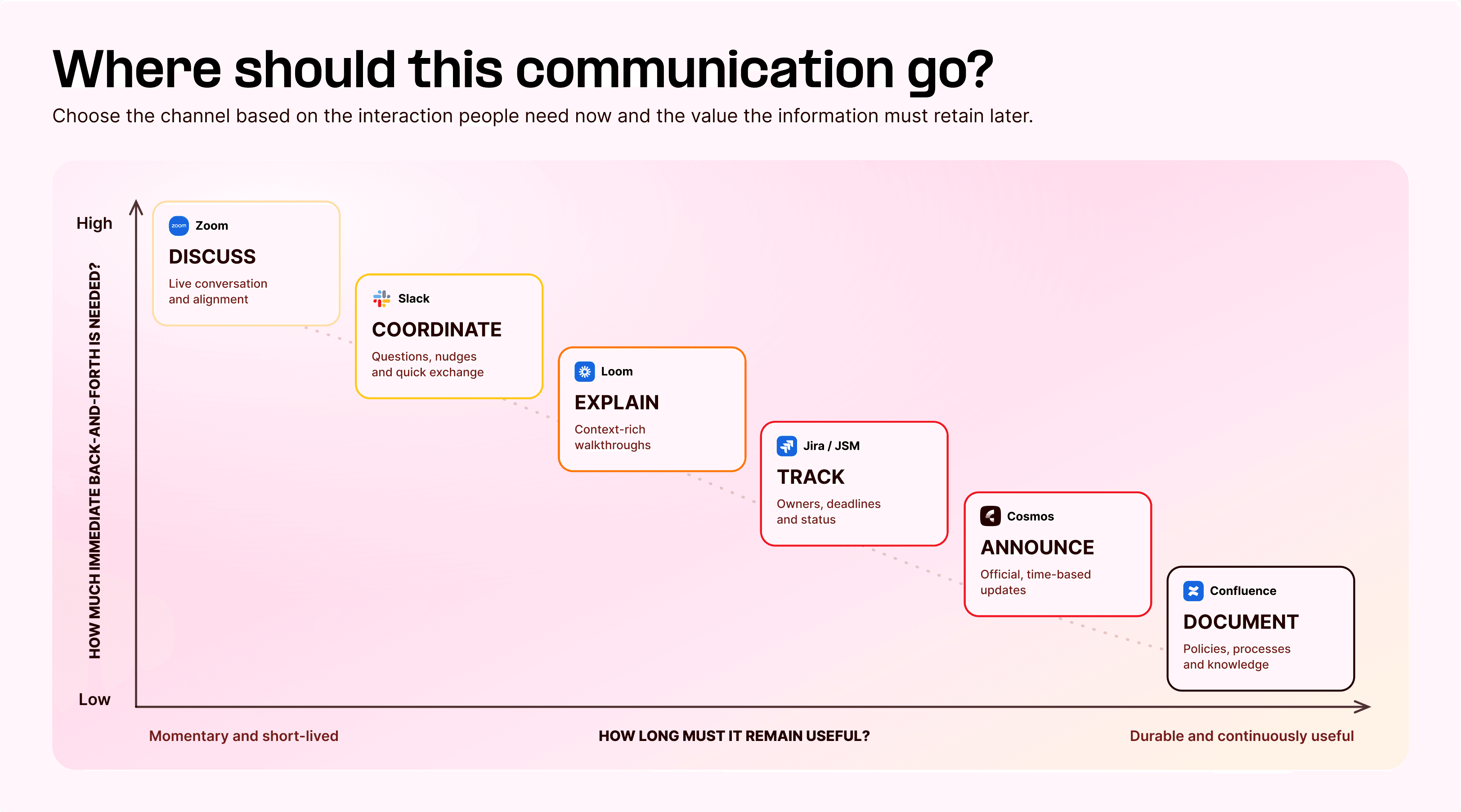
The key is giving every channel a clear role
At this point, it might sound like I’m suggesting that every piece of information needs to be published everywhere. That’s not the point. These channels aren’t competing with one another, and our goal isn’t to force all communication into one tool. Different forms of communication need different channels. Each one solves a different problem.
Let’s look at a few simple examples:
A new company travel policy needs to be shared with everyone. It should be documented in a Confluence page that’s always accessible. But employees need to be directed to that page; that’s when a simple Slack message in a company-wide channel helps spread the word about details like the timeline, actions, etc.
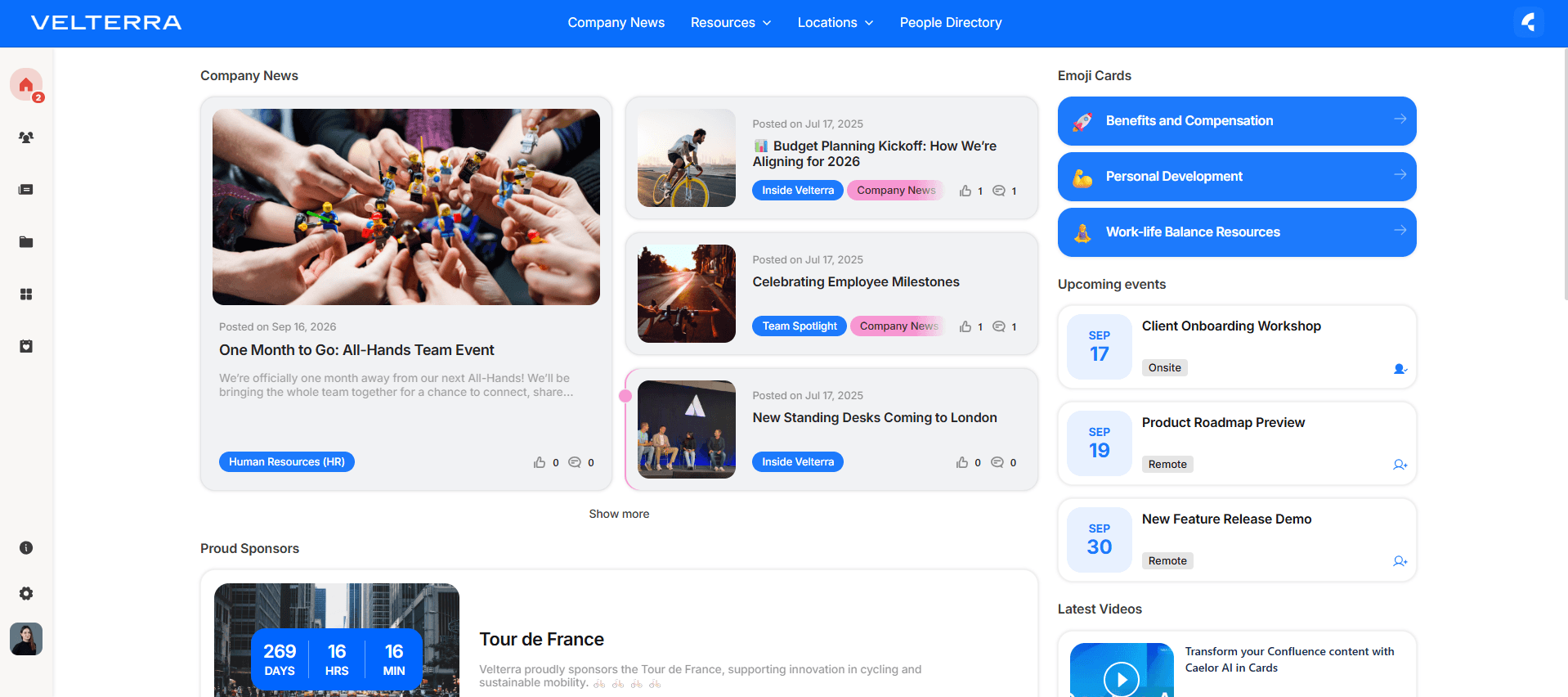
You have an all-hands team event in one month. This is time-bound information. People need to know about it now, but the information is only relevant for a specific period. That makes the intranet the perfect place to announce it, especially if your intranet can highlight news, surface it to the right audience, and keep it visible as the event gets closer, as you can see with Cosmos below.
You’re launching a new product feature. The documentation should always live somewhere people can come back to, naturally a Confluence page. But a visual walkthrough can make the feature much easier to understand, especially when people need to see how the new flow actually works. That’s where Loom works its magic.
And for important updates, don’t always rely on just one type of communication. Sometimes you need both a live discussion and a written update that people can access afterwards. A meeting might be useful if the change is complex or likely to generate questions, but the important information should still be documented somewhere people can refer back to later. Some people may be out of office, on sick leave, or simply unable to join the meeting. They shouldn’t miss important information because they weren’t there at the right time.
The actual problem starts when the full information is copied independently into every channel, and nobody knows which version is the accurate source of truth.
How we adapt this at Caelor
The point of all this isn’t to create a perfect list of categories. It’s to make sure everyone on the team understands what each channel is for and uses the same approach adapted to our own culture and dynamics.
This is how we make this work at Caelor:
Company-wide announcements are published in our intranet news.
Policies, processes, and other information that need to remain up to date live on Confluence pages.
Tasks, requests, and operational work are tracked in Jira or Jira Service Management.
Slack is used for questions, coordination, and informal conversation.
Loom is used to add explanation and visual context.
Meetings are used when live discussion adds value, and we always make sure to document their outcomes.
Internal emails are used for notifications and formal announcements.
If you also need to create your own guide, just start with answering the first question. “How long does this information need to stay useful?” Ask it before you open a channel, and you’ll already have a much clearer idea of where the information should live.
One thing that prompted all of this and also made all this easier for us is our Confluence-based intranet: Cosmos. With intranet news feeds, categories, and targeting, company-wide announcements can reach the right audience at the right time with less effort, while still building on Confluence’s own blog posts.
But the tool alone isn't enough. Team alignment is what actually makes the tool work. A company that knows what each channel is for will communicate well with almost any tool stack.
After all, the goal isn’t to use more resources, but to make sure people know where to find what they need, when they need it.
